AI Mockups Are Not Print-Ready: Why Your AI Design Still Needs a Designer
We now receive AI mockups every day: a gazebo with the client's name on the canopy, a box with the product on the front, a banner with the offer in big letters. They look finished. Some look better than the brief. Then the quote arrives with a design fee on it, and the question comes back every time: the AI did this in five minutes, why does it cost so much to redesign?
The honest answer is that the AI made a picture of a design, not a design. A picture is what you see on a screen. A design is a file a press can print at full size, with the real logo, real text, real colours and the right shape, trimmed in the right place. This guide explains the difference, what our studio does to get from one to the other, and how to use AI so that it helps your print job instead of adding a step.
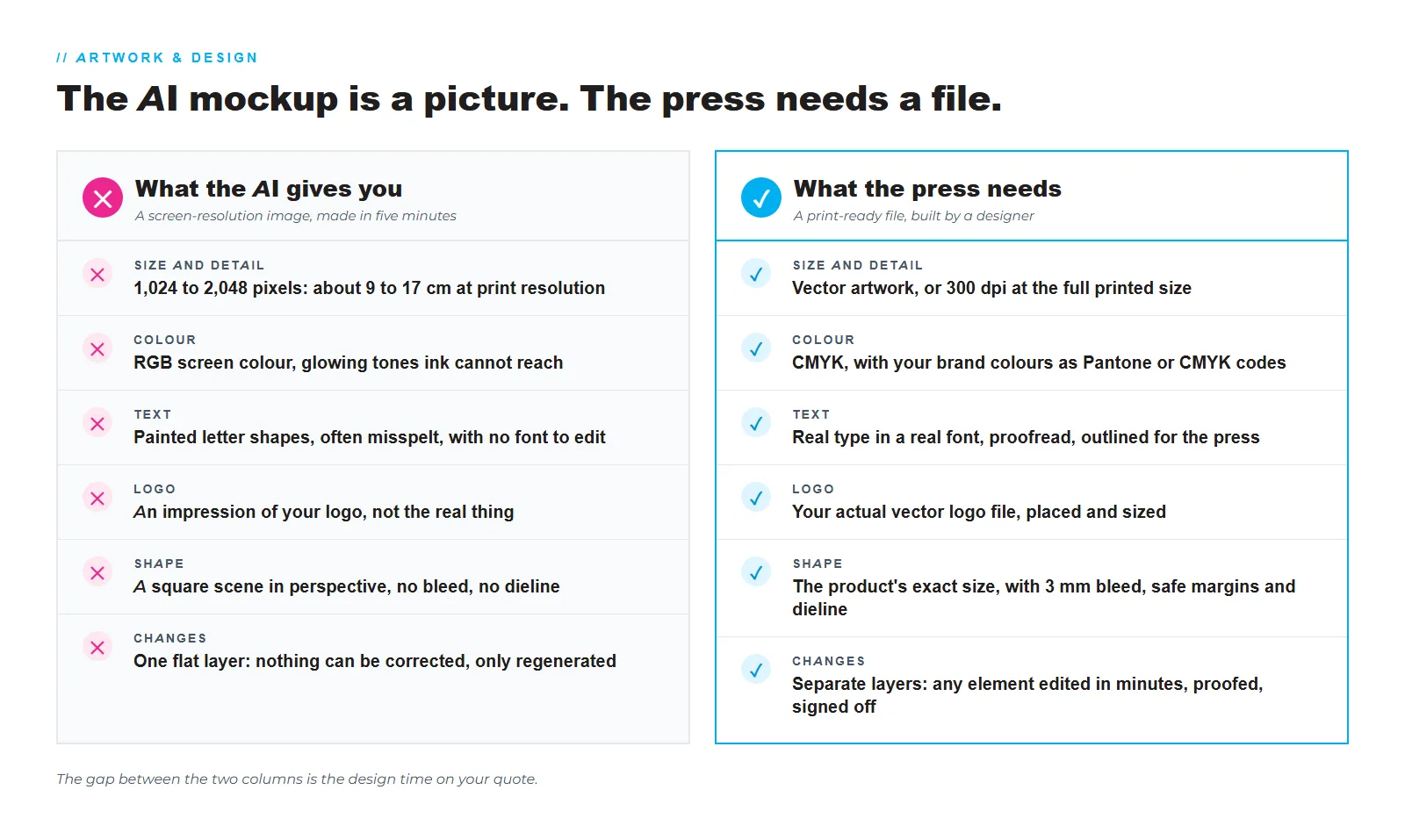
An AI mockup is a screen-resolution picture of an idea. It cannot be printed as it is. It is too small for print, it is in screen colours, its lettering is painted shapes rather than text, its logo is an impression of yours, it has no bleed, no dieline and no layers, so nothing in it can be corrected. To print it, a designer rebuilds the layout as a print-ready file, which is skilled work billed from R450 per hour, depending on the seniority of the designer, or as a flat project fee. Bring the mockup as a reference, together with your real logo, wording and brand colours, and the rebuild is quicker and cheaper.
A picture is not a print file
Every AI image generator produces the same thing: a flat raster image, usually between 1,024 and 2,048 pixels on its long side, in RGB screen colour, with every element painted into one layer. That is ideal for a screen. A press needs something else entirely, and our Help Centre spells it out: artwork at 300 dpi at full size in CMYK, fonts converted to outlines, images embedded, 3 mm bleed on every trimmed edge, and text kept 3 to 5 mm inside the trim.
| The AI mockup | The print-ready file | |
|---|---|---|
| Size and detail | 1,024 to 2,048 pixels, whatever the product | Vector artwork, or 300 dpi at the printed size |
| Colour | RGB screen colour, often glowing and out of gamut | CMYK, with your brand colours specified |
| Text | Painted letter shapes, often misspelt or invented | Live type in a real font, outlined for the press |
| Logo | An impression of your logo | Your actual vector logo file |
| Shape | A scene or a square, in perspective | The product's exact size, with bleed, trim and dieline |
| Layers | One flat image | Separate text, logo, images and background |
| Can it be changed? | No, only regenerated | Yes, any element, in minutes |
| Rights | Unclear, and it may borrow other brands | Yours on payment, built from your assets |
Six reasons an AI image cannot go straight to print
There is a seventh point that matters more on some jobs than others. AI images often contain people, products and brand marks that are not yours, and the usage rights to the image itself are unclear. Artwork we design for you is built from your own assets, and the rights transfer to you on payment, which is a cleaner position for a shop sign, a product box or a campaign that will be seen by thousands of people.
What a designer does with your mockup
We like receiving AI mockups. They tell us what you want faster than most briefs. What happens next is a rebuild, not a touch-up:
- Set up the real product. The artboard is created at the exact printed size, with 3 mm bleed, safe margins and, for packaging and displays, the dieline or cut path the machines will follow.
- Place your real assets. Your vector logo, your exact wording, your brand colours and any photographs at a resolution that holds up at full size. If the AI image used a product shot that is not yours, we source or shoot one that is.
- Redraw the design. Shapes, panels, patterns and effects are rebuilt as vector artwork so they stay sharp at any size, following the mockup's composition and improving it where print needs it.
- Set the type. Headlines and body copy are set in real fonts, sized to read at the viewing distance, spelled the way you wrote them, then outlined for the press.
- Convert and check the colour. Everything moves to CMYK, with Pantone or CMYK codes for the brand colours, so what you approve is what the press lays down.
- Proof. You receive a proof to check and sign off; our design quotes include a standard allocation of two to three proofing rounds. Once signed, the order is locked for production.
- Export. A print-ready PDF with outlined fonts and embedded images goes to prepress, and the AI or EPS master files are yours on request.
Why five minutes of AI costs hours of design
The mockup took the AI five minutes because the AI skipped everything that makes a file printable. The hours on your quote are those steps. Our studio bills design from R450 per hour, depending on the seniority and experience of the designer on the job, or as a flat fee for a scoped project, and you see the figure before any work starts. Simple artwork fixes take one to two business days; a full packaging dieline or a custom display layout can take a week, and your quote states the timeline.
It helps to compare the alternatives. A mockup printed as it is comes out soft, with colours that have shifted and letters that look wrong up close, on a product you still paid full price for. A reprint of a 3 m banner, a run of boxes or a shopfront sign costs far more than the design time that would have prevented it. The design fee buys the thing the AI cannot give you: a file that prints correctly the first time, that you own, and that can be changed next season without starting over.
How to use AI the smart way
Our design studio handles the rebuild in-house, alongside the print, so the file is set up for the exact machine, material and finish your job will run on. Artwork and turnaround questions are answered in our Help Centre, and agencies can route design and print through our Reseller Partner Programme.
Frequently asked questions
Can you print my AI image exactly as it is?
Only as a picture, at a size its pixels can support, and at your own risk on quality. At 300 dpi a typical AI image is 9 to 17 cm wide. Anything bigger means visible softness, and the colours, text and logo will print as the AI drew them, mistakes included. For anything with your brand on it, we recommend a rebuild.
Why can you not just upscale it?
Upscaling makes the image bigger, not more detailed. It smooths and sharpens the pixels it has, so a soft logo becomes a cleaner soft logo. It cannot fix wrong letters, screen colours, a missing bleed or a logo that is not quite yours. Those need a designer.
How much does it cost to redesign an AI mockup?
Design is billed from R450 per hour, depending on the seniority and experience of the designer, or as a flat fee for a scoped project, quoted before work starts. A simple layout with your logo and a few lines of text is a small job; a packaging dieline or a multi-panel display takes longer. Send the mockup and your assets and we will quote it.
How long does the redesign take?
Simple artwork fixes typically take one to two business days. Complete packaging dielines or custom exhibition displays can take up to a week. Your quote states the timeline, and rush options exist for deadlines.
Will I own the artwork afterwards?
Yes. On full payment for the design work, ownership and usage rights of the finished artwork transfer to your business. You receive print-ready PDFs, and the master files on request, so the next print run or the next printer can use them.
What should I send with my AI mockup?
Your logo as a vector file, your brand colour codes, the exact wording, the product and its size, and the mockup itself with a note on what you like. Reference photos, sketches and mood boards are welcome too.
Can I design it myself and have you check it?
Yes. Supply a print-ready PDF or AI file to our Help Centre specifications and we pre-flight it before printing. If something is off, we will tell you what, and quote the fix if you would like us to make it.
Does this apply to a quick A4 poster too?
The same rules apply at every size, but the stakes rise with the size and the quantity. A single A4 poster printed from an AI image will look soft; a 3 m banner, a shopfront sign or a thousand boxes printed from one will look wrong and cost a great deal to replace.
Got an AI mockup? Send it to us
Attach the mockup, your logo and your wording, and tell us the product and the size. We will quote the rebuild honestly, design it in our Cape Town studio, and send a proof before anything prints.
Request a quote